Back to Landing Page

Amanah Sport Live Demo Environment

The live demo runs on a dedicated subdomain so you can test the full multi-slot booking cart, session cookies, and admin dashboard exactly as deployed in production.

Connected live to the Rust + PostgreSQL backend at https://demo.amanahsport.cloud

Ready-to-Use Demo Credentials (Click to Copy)

Use the official demo accounts below to sign in as Superadmin (Owner & Cashier) or Player (Member) when exploring the live sandbox.

Superadmin, Owner, & Cashier Account

Full Admin Console Access
Password DemoAmanah2026!

Sign in at /admin/login to explore Today Summary, Multi-Branch Revenue Analytics, Cashier Schedule Grid, and Theme Appearance.

Player & Open Play Host Account

Member & Checkout Access
Password 123456789

Select the Email tab at /login to test multi-slot court checkout, inspect e-tickets, and host Open Play (Mabar) sessions.

Member: [email protected] / 123456789

Player Booking & AI Assistant Flow

Public Venue Page, Real-Time Calendar, & AI Chat

Switch branches, inspect live court availability today, add multiple hours to your booking cart, and sign in with [email protected].

  • Pick dates and watch real-time slot availability
  • Open the AI Assistant widget in the bottom-right corner
  • Toggle between ID and EN locales in the top navigation bar
Open Demo
Publicly accessible or login [email protected]

Community Open Play (Mabar) Flow

Public Match Hosting & Player Quota Splitting

See how booked courts can be opened to community players looking for match partners, helping venues boost off-peak court utilization.

  • Browse active Open Play sessions and remaining player spots
  • Inspect skill level tags, court assignments, and per-player fee splits
  • Directly synchronized with the main venue court calendar
Open Demo
Admin: [email protected] / DemoAmanah2026!

Cashier Desk, Schedule Grid, & Multi-Branch Admin

Daily Operations & Owner Financial Analytics

Simulate walk-in guest registration at the cashier counter, manual transfer receipt verification, peak-hour pricing rules, and branch reports.

  • Daily cashier matrix & rapid walk-in guest entry without email
  • Manual payment proof approval queue & unified omnichannel inbox
  • Branch settings, peak-hour tariffs, promo vouchers, and revenue analytics
Open Demo

Product Walkthrough: Player, Open Play, Cashier, & Owner Flows

Watch the real workflow from multi-slot court selection and Open Matchmaking Directory to daily cashier operations and multi-branch revenue analytics.

Amanah Sport Arena court booking interface showing date picker, sport category pills, and 2-slot cart bar Open Matchmaking Directory displaying Padel and Badminton Open Play sessions with per-slot split pricing Daily operations dashboard displaying 13 verified bookings today, paid session statuses, and sport revenue breakdown Owner Reports and Analytics dashboard showing total revenue, booking trend chart, and branch comparison between GOR Arena Antasari and GOR Sukajadi

Public Demo Sandbox Notes

  • Bookings and chat messages created in the demo environment are visible to other evaluators testing the sandbox.
  • Payment checkouts run in sandbox simulation mode so no real funds are charged.
  • Want to test a private pilot instance configured with your own venue name and tariffs? Message us on official WhatsApp +62 821-2190-9056.
Ask on WhatsApp

Official Product Owner WhatsApp: +62 821-2190-9056

Official Notice

Official Purchase & Consultation Verification

+62 821-2190-9056

Ensure every consultation, quotation, and license transaction happens exclusively through verified Amanah Sport & Amanah Karya Perdana channels to stay protected from impersonators.

Official Support & Invoice Email: [email protected] Created by Amanah Karya Perdana (amanahkaryaperdana.com)
  • Our sole official WhatsApp number for consultation, demo scheduling, and license ordering is +62 821-2190-9056. Always confirm the destination number in your WhatsApp app before messaging.
  • Official written billing invoices and verified payment details are sent strictly from [email protected] after confirmation on official WhatsApp. Self-serve online checkout links on amanahsport.cloud are upcoming and not active yet.
  • We never authorize any agent, broker, or third party to collect payments without official WhatsApp +62 821-2190-9056 confirmation and a written invoice from [email protected]. Transactions outside official channels are not covered.
Video Highlight: Full Theme Builder & Branch Operations Setup

No-Code Website Theme Builder & Complete Branch Operations Setup

Without touching a single line of code, venue owners can customize brand colors, add custom sport categories, configure PB1/VAT tax rates, connect personal Midtrans/Xendit API keys or manual transfer accounts, and switch dynamic AI providers (Claude, Gemini, OpenRouter) from the Superadmin console.

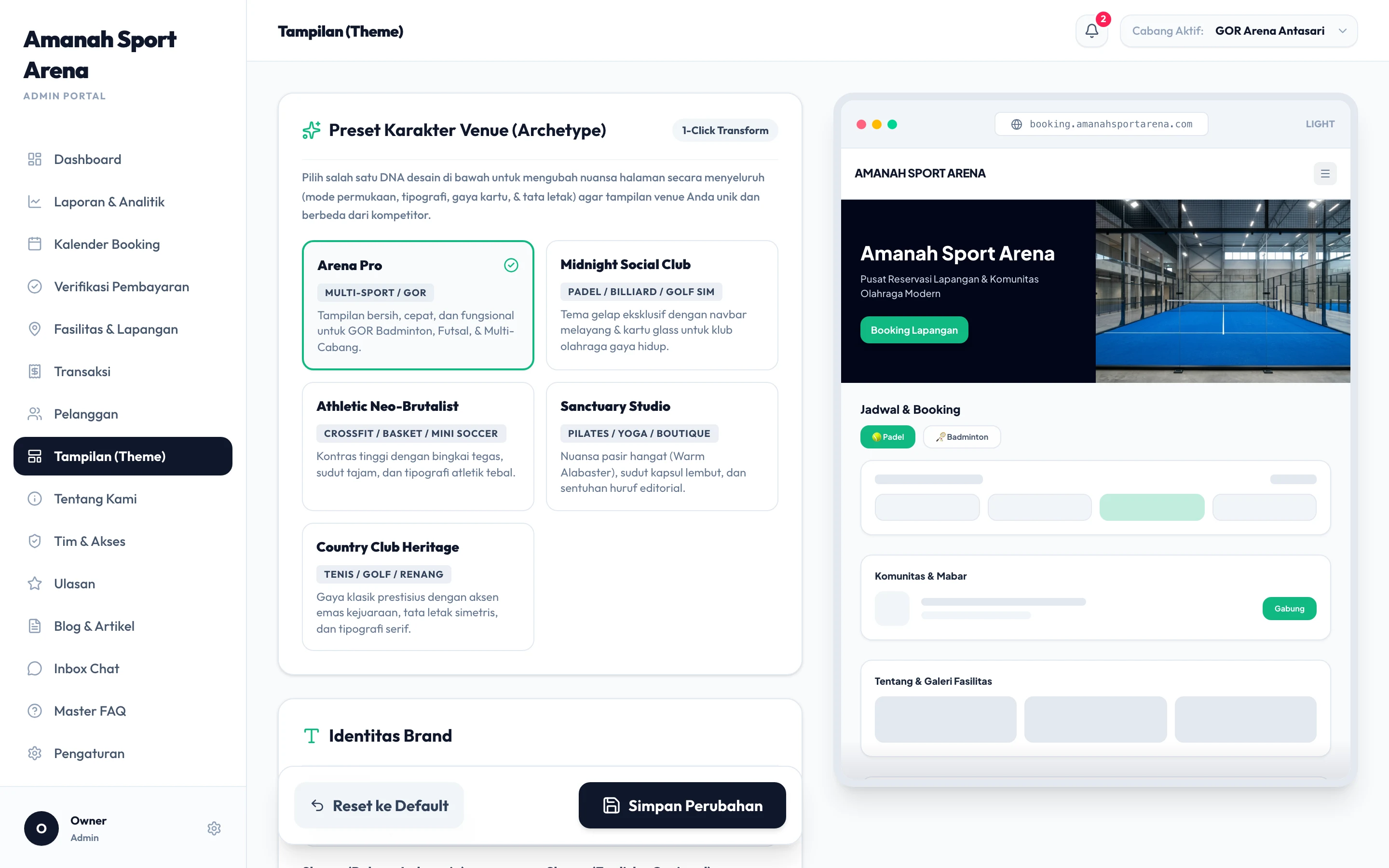
Admin Menu: Appearance Setup (/admin/appearance)

Full Website Appearance & Theme Builder

Tailor the visual look and layout of each branch booking site to match your sports club identity.

Admin Menu: Branch Settings (/admin/settings)

Tax Setup, Personal Gateway Keys, & Dynamic AI Hub

Control local tax rules, your own Midtrans/Xendit payment gateway keys, manual transfer bank accounts, and dynamic AI providers from one screen.

Explore All 12 Admin Console Modules

Click any module below to inspect the real Retina screenshot from GOR Arena Antasari along with a direct link to test that screen in the live demo.

/admin/appearance

Theme Archetypes, Brand Colors, & Section Layout Builder

Configure visual archetypes, color palettes, hero imagery, schedule calendar style, and homepage section ordering visually.

  • Ready-made theme presets & custom brand colors
  • Matrix Grid or Card schedule layout switcher
  • Homepage section visibility & order control
Screenshot of /admin/appearance
Video Highlight: Customer Member Portal

Complete Player Portal: Upcoming Schedule, QR E-Ticket, Interactive Calendar, & Member Sub-Menus

Every player gets a self-service member hub (/dashboard) to open QR E-Tickets for their upcoming match, inspect daily schedules on the interactive calendar, manage Open Play cost splitting, rebook favorite courts, and share referral codes.

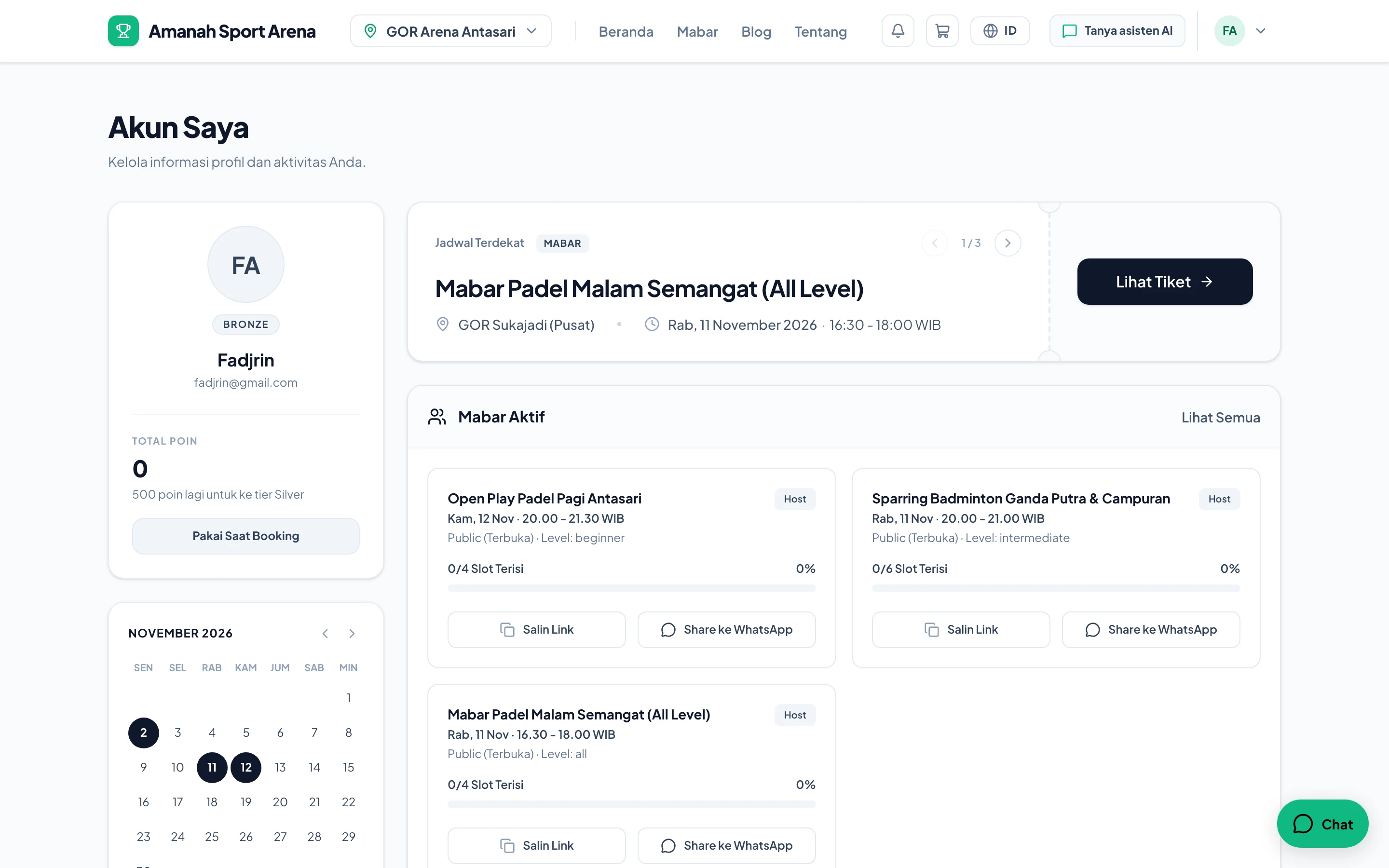
Overview & Upcoming Match /dashboard

Upcoming Match Card, Loyalty Point Tier, & Active Open Play

Upon logging into /dashboard, players immediately see their nearest upcoming match with a one-click View Ticket button, loyalty point balance, monthly activity calendar, and active Open Play sessions.

View Ticket & QR Pass /dashboard

Official Booking Pass, Check-In QR Code, & Payment Invoice

Clicking View Ticket on the upcoming schedule opens the Booking Details modal featuring both the itemized Payment Summary tab and the Official QR E-Ticket tab for front-desk check-in.

Schedule by Calendar Date /dashboard

Interactive Monthly Calendar & Per-Date Activity Modal

Dates with active court bookings or Open Play sessions are highlighted on the monthly calendar. Clicking any highlighted date (such as November 11 or 12) opens a modal listing every session on that day.

Explore All 9 Views & Sub-Menus of the Player Portal

Click any tab below to inspect real screenshots of the Upcoming Schedule card, QR E-Ticket modal, per-date activity popups, and all bottom member navigation menus.

/dashboard

Upcoming Match Card, Loyalty Point Tier, & Active Open Play

Upon logging into /dashboard, players immediately see their nearest upcoming match with a one-click View Ticket button, loyalty point balance, monthly activity calendar, and active Open Play sessions.

  • Upcoming Match card with instant View Ticket action
  • Member tier badge (Bronze/Silver/Gold) & point progress
  • Direct Copy Link & Share to WhatsApp buttons for Open Play
Main /dashboard view showing Fadjrin profile, Upcoming Schedule card, November 2026 calendar, and Active Open Play cards